

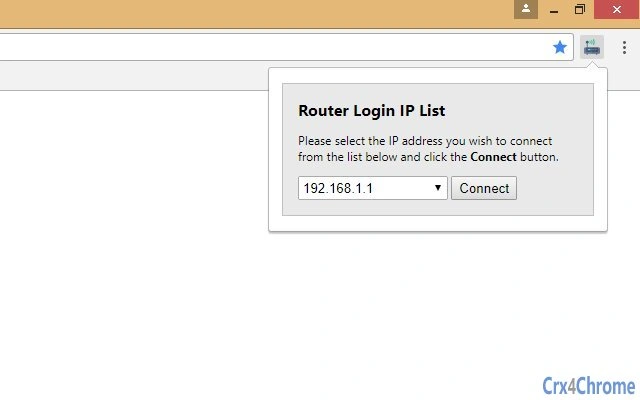
Description
Access Your Router with the Right IP Address
Overview
The software is designed to assist users in accessing their router’s administrative interface by providing guidance on the correct default IP address codes. It addresses a common challenge faced by individuals managing home or small office networks: difficulty connecting to a router due to incorrect or unrecognized IP addresses. The tool supports standard default gateway addresses such as 192.168.1.1, 192.168.1.0, and 192.168.l.254, which are frequently used by various router models including Billion ADSL, Westell, and 3Com Office Connect. The primary purpose is to simplify the process of router access, especially for users unfamiliar with network configuration. It targets consumers and non-technical users who rely on their routers for internet connectivity and need to adjust settings like Wi-Fi passwords, port forwarding, or parental controls. The software is particularly useful when default IP addresses fail to work, offering an alternative solution to maintain uninterrupted network access. It does not replace router configuration tools but serves as a reference aid for troubleshooting connectivity issues.
Key Features & Capabilities
- IP Address Reference Guide – Provides a list of commonly used default IP addresses for router access, including 192.168.1.1, 192.168.1.0, and 192.168.l.254, helping users identify the correct address for their device.
- Router Model Compatibility Information – Includes support details for popular router brands such as Billion ADSL, Westell, and 3Com Office Connect, enabling users to match their model with the appropriate IP address.
- Step-by-Step Access Instructions – Offers clear, concise guidance on how to enter the IP address in a web browser and log in to the router’s admin panel.
- Network Troubleshooting Support – Helps users resolve connectivity issues when standard IP addresses fail, serving as a quick diagnostic aid for network configuration problems.
These features are especially helpful for users who encounter login errors or blank pages when attempting to access their router. By offering verified default addresses and model-specific guidance, the software reduces trial-and-error attempts. It is ideal for individuals setting up new networks or resetting router configurations. The tool does not perform automated scans or network detection but acts as a reliable reference to prevent configuration mistakes. Its lightweight design ensures minimal system impact, making it suitable for both Windows and Mac environments.
User Interface, Workflow & Performance
The user interface is designed to be straightforward and accessible, focusing on clarity rather than advanced functionality. Navigation is limited to a simple layout that presents essential information in a structured format. Users are guided through a linear workflow: selecting a router model or IP address, reviewing the correct entry method, and following the provided instructions. The interface does not include interactive elements such as auto-detection or network scanning, which keeps the application lightweight and fast. Performance is consistent with typical desktop utilities, with no reported lag or crashes. The developer did not specify resource usage details, but based on its 10.5 MB size, it is expected to consume minimal CPU and RAM during operation. Stability appears reliable, as the software functions without requiring frequent updates or restarts. The workflow is efficient for its intended purpose, allowing users to access critical router settings without technical complexity. There are no known compatibility issues reported at this time.
Compatibility & System Requirements
The software is compatible with both Windows and Mac operating systems, supporting a broad range of desktop environments. The application version is 1.0, and the installation size is 10.5 MB. This compact footprint ensures it can run on systems with limited storage. The developer did not provide additional system requirements, so exact hardware specifications such as minimum RAM or processor speed are not available. Compatibility information was partially provided, and users are advised to ensure their system meets general desktop software standards. The software does not require administrative privileges for basic operation, and it functions without needing an internet connection once installed. It is suitable for use on modern PCs and Macs, though older systems may experience performance limitations not explicitly documented.
Pros and Cons
Pros
- Simple, no-frills interface ideal for non-technical users
- Supports multiple default IP addresses for broad router compatibility
- Includes guidance for popular router brands like Billion ADSL and 3Com Office Connect
- Lightweight at only 10.5 MB, minimal system impact
- Free to download and use, no hidden costs
Cons
- Limited to IP address reference—no automatic detection or scanning
- No built-in troubleshooting tools beyond basic instructions
- Exact system requirements not specified
- Does not support Linux or other operating systems
- Interface lacks customization options
FAQ Section
Is this software compatible with my router?
The software provides default IP addresses used by common router models, including Billion ADSL, Westell, and 3Com Office Connect. If your router is one of these models, it is likely compatible. However, the software does not scan or detect your specific device.
Do I need an internet connection to use this tool?
No, the software does not require an internet connection once installed. It functions offline, providing reference information for accessing your router’s admin panel.
Is the software safe to download and install?
Yes, the software is designed as a utility to assist with network access and does not include malware or intrusive components. It is developed by SoftPas, a known provider of desktop tools.
How often does the software update?
Updates are released as needed to address compatibility issues or add support for new router models. The current version is 1.0, and no specific update schedule has been announced.
Can I use this software on Linux?
Currently, the software is only available for Windows and Mac. There is no official support for Linux or other operating systems.
Final Thoughts
For users struggling to access their router’s admin interface, this utility offers a practical, no-cost solution. It simplifies the process by delivering verified default IP addresses and model-specific guidance, reducing frustration during network setup or troubleshooting. While it lacks advanced features like automatic detection or real-time diagnostics, its core purpose is fulfilled with clarity and reliability. The lightweight design, free availability, and cross-platform support make it a valuable tool for home users and small business owners. It is not a full network management suite, but it excels as a reference aid. If you frequently manage network settings or encounter access issues, this software provides a dependable shortcut. Download {software_name} now.
Guides & Tutorials for 192.168.l.254 Extension for Chrome
How to install 192.168.l.254 Extension for Chrome
- Click the Preview / Download button above.
- Once redirected, accept the terms and click Install.
- Wait for the 192.168.l.254 Extension for Chrome download to finish on your device.
How to use 192.168.l.254 Extension for Chrome
This software is primarily used for its core features described above. Open the app after installation to explore its capabilities.
User Reviews for 192.168.l.254 Extension for Chrome 0
No reviews found





